 Threadlode
Your text message backups, readable again
Backups of text messages are hard to open: Android’s SMS Backup & Restore makes huge XML files, and an iPhone backup hides your messages in a database with scrambled file names. Threadlode opens both in your browser and shows them as normal conversations – with photos, search, and export to PDF, Excel, CSV or an HTML archive.
Open my backup for free Pricing ($15 once)
- Runs in your browser, offline – messages are never uploaded
- Android XML (SMS + MMS photos), iPhone backups (sms.db), Mac Messages (chat.db)
- Reading and search are free with no limit
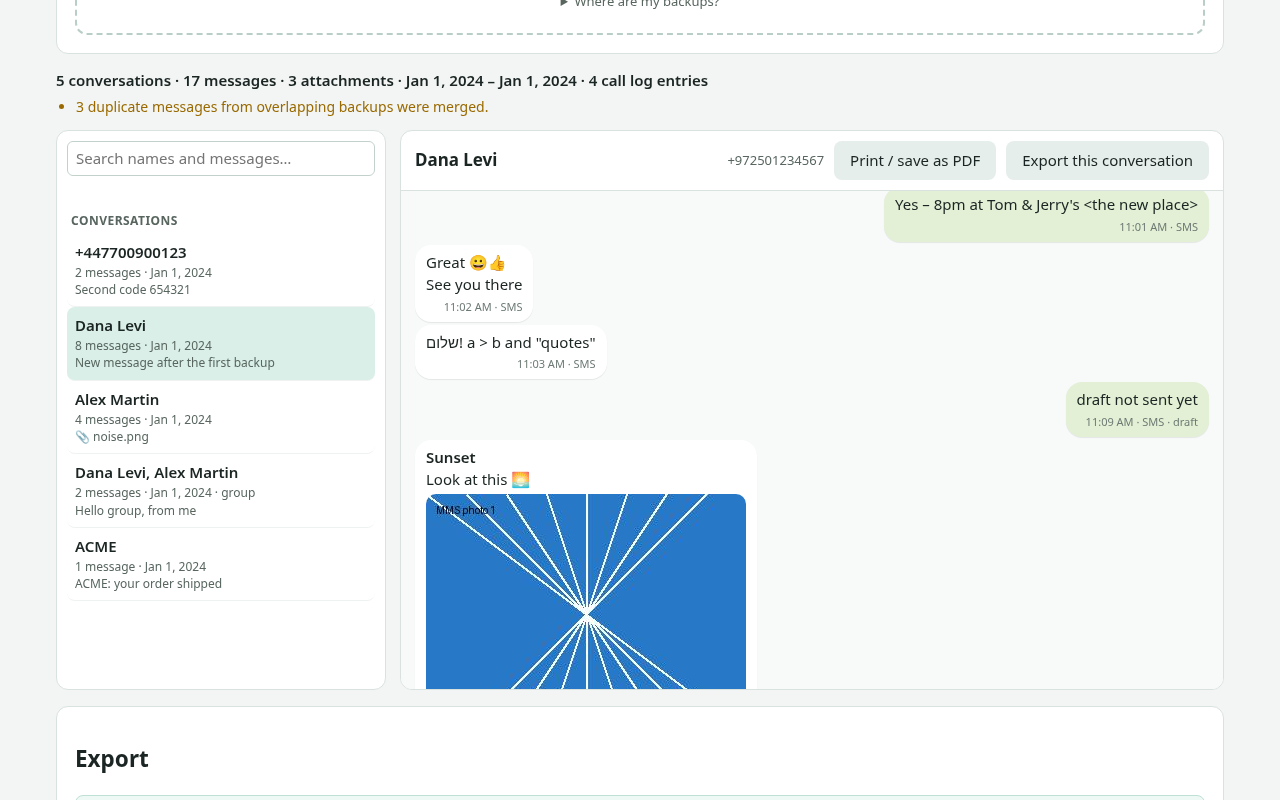
What Threadlode does
Android: SMS Backup & Restore
Opens the sms-….xml files of the popular Android app, including MMS photos, group messages and emoji. Multi-gigabyte files are read piece by piece. Load several backups at once – duplicates are merged. Call logs (calls-….xml) can be exported to CSV.
iPhone: unencrypted backups
Choose the backup folder that iTunes (Windows) or Finder (Mac) made. Threadlode finds the Messages database, the contacts and the attachments inside it, and shows iMessage and SMS conversations – including tapbacks, edited and unsent messages, and group names.
Mac: the Messages folder
Open ~/Library/Messages (or a copy of it) to read chat.db with its attachments. Recent messages that are still in chat.db-wal are included.
Search everything
Search across all conversations at once and jump straight to the message. Filter conversations by name or number.
Export the way you need it
Print or save a conversation as PDF, export Excel (.xlsx) or CSV with one row per message, or a complete HTML archive (.zip) with one page per conversation and all attachments.
Private by design
The app page blocks all network connections. Your backup is read on your computer, and the results are written on your computer.
How it works
- Find your backup: the
.xmlfiles from SMS Backup & Restore, or the iPhone backup folder (see where iPhone backups are stored). - Open Threadlode and choose the files or the folder.
- Read and search your conversations.
- Export: PDF (print), Excel, CSV, or a full HTML archive with attachments.
Threadlode only reads your backup – it never changes or deletes anything in it.
Guides
Good to know before you start
- Encrypted iPhone backups are not supported. If “Encrypt local backup” is on, Threadlode shows a clear message. You can make a new, unencrypted backup (you will need the backup password to turn encryption off).
- Threadlode reads backups that already exist. It does not connect to your phone, iCloud or Google, and it cannot recover messages that were deleted before the backup was made.
- HEIC photos from iPhones are exported unchanged; most browsers other than Safari can’t display them inside the app, but you can download them.
- A desktop browser works best: Chrome or Edge (folder picker, saving big archives directly), Firefox and Safari via folder upload. Very large iPhone backups can take a while to list.
- Only open backups of your own messages, or messages you are allowed to access.
Questions and answers
Are my messages uploaded anywhere?
No. Threadlode runs in your browser. The app page has a Content Security Policy that blocks all network connections, and it keeps working with Wi-Fi turned off once loaded. See the privacy page.
What does the free version do?
Opening backups, reading every conversation and searching are free with no limit. Each export or printout includes the 200 most recent messages of your selection, so you can check the result. A one-time $15 license exports everything.
Which backups can Threadlode open?
Android: XML files from “SMS Backup & Restore” (SMS, MMS with attachments, call logs). iPhone: unencrypted iTunes/Finder backups (iOS 10 or later layout). Mac: the Messages folder with chat.db. You can also open an sms.db or chat.db file on its own (without attachments).
Can it read WhatsApp, Signal or Telegram?
No – Threadlode is for SMS, MMS and iMessage. WhatsApp chats are a different format.
Is Threadlode made by Apple or by the SMS Backup & Restore developers?
No. Threadlode is an independent tool and is not affiliated with Apple, Google or the makers of SMS Backup & Restore.